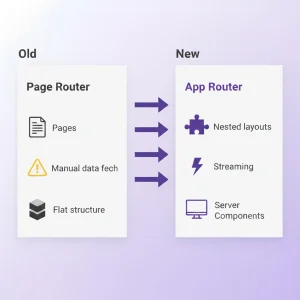
App Router was first introduced in Next.js 13 and it is now the best recommended way to build apps in Next.js 15. This brings a significant revolution in building React applications. It switches from a page router system to a more flexible, nested layout system with built-in support for React Server Components (RSC), streaming, and file based structure. This router system takes you from the basics, like setting up the first route, to the advanced concepts like parallel routes, intercepting routes, and server actions. If you’re moving away from Page Router or starting from scratch, you’ll learn how to use App Router for faster, more scalable applications with smoother server-client communication and interactions, including code snippets, lazy loading, error handling.
Purpose of the App Router
App Router was created to overcome from the limitations of Page Router and embrace ReactJS’s evolution towards server-first rendering.
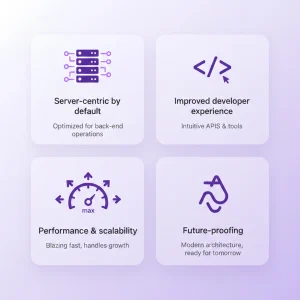
- Server-centric by default: In App Router, most of the codes run on the server side instead of browser. It helps to reduce amount of javascripts which are sent to users. App router makes faster page reload and secure.
- Improved developer experience: In app router file are organized more naturally with nested layouts, and skip redundance codes. These make easier to build and maintain applications.
- Performance and scalability: It helps to support streaming UI. This means some parts of the page will load instantly while others load gradually.
- Future-proofing: It is built to work with the latest features of React.JS. for an example it works with new compiler and async functions.
Ultimately, App Router provides the ability to create a full-stack application where the server does the heavy lifting of the application while the clients remain lean and layouts persist across navigation.
Key Concepts: Rendering and Boundaries
The App Router introduces a new model with Server Components and Client Components. Here’s how it differs from traditional rendering:
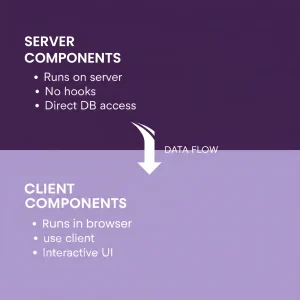
Server Components (RSC)
- By default they run on the server side and they send ready made HTML codes to browser.
- Server components are useful for layouts, long listings, static sections, handle heavy data.
- As they don’t run in the browser, there is no hydration issues. Server components can fetch data directly from any Database.
- In server components, we can’t use any hooks like useState, useEffect or other custom hooks.
Client Components
- To run client components in the browser you need to add “use client” at the top of the code.
- It is used for interactive communicating with users like submitting forms, clicking buttons, modals.
- It is slow for loading as they bundle javascripts.
Other Rendering Modes
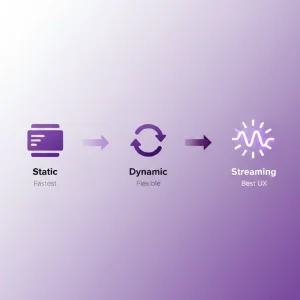
- Static Rendering: It generated faster and cached pages that rarely changed.
- Dynamic Rendering: In this rendering, page renders on every single request. to do so, you need to put this code: export const dynamic = “force-dynamic”
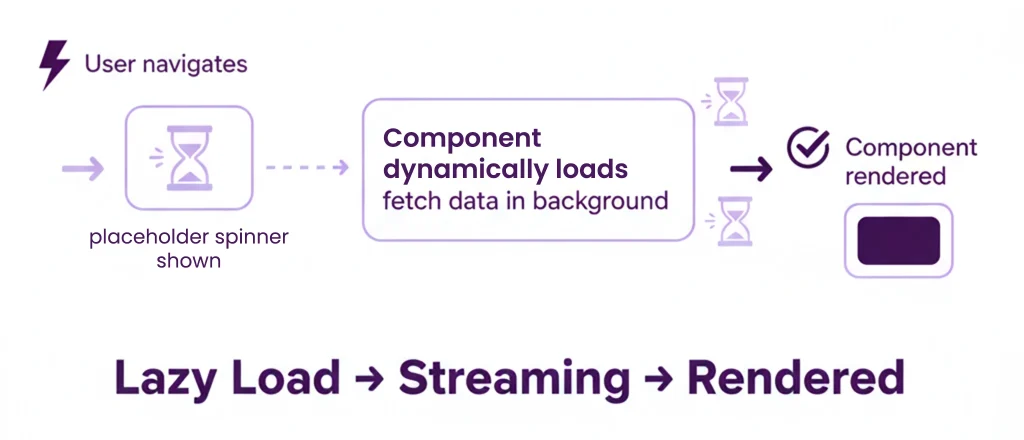
- Streaming: is used to load some parts of the page immediately while other streams in. These improves speed and avoid the waiting for full page loading.
Benefits of the Next.js App Router
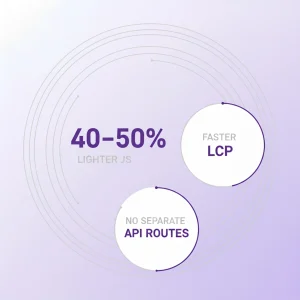
- As the most components run at server side, browser downloads less javascripts. That’s why applications become 40-50% lighter and makes interactions smoother and faster.
- Stream the most important parts of the page show instantly while the rest loads gradually. This improves Largest Contentful Paint (LCP). It helps the pages load in within 1 second.
- Simplified Full-Stack: Data updates can be handled directly from components with server actions. For this we don’t need separate API routes.
- Enhanced Developer Experience: Next.js gives a clear file based, and reloading works in complex nested routes that makes faster development and smooth browsing.

Key Features of the App Router
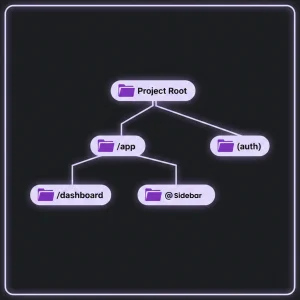
- Nested Layouts: /app/dashboard/layout.tsx wraps all child routes with shared UI.
- Route Groups: (auth)/login/page.tsx for logical grouping without URL impact.
- Parallel Routes: @sidebar and @content slots for multiple display sections. It is usefull for dashboards, splited views and multi-pane layouts.
- Intercepting Routes: (.)search is used to load pages on top of existing pages as modal overlays, popups without routing other page.
- Server Actions: On server side, async functions that are run can handle form submissions or data updates securely without extra API routes.
- Metadata API: For better SEO, we use metadata that supports static and dynamically.
- export const metadata={title: ‘My-App’ };
- Streaming and Suspense: <Suspense fallback={}>. Spinner will be shown before PostData components loads. after fetched then spinner will automatically removed.
How to Create a Project with App Router
C:\my-app>npx create-next-app@latest
√ What is your project named? … my-app-router
√ Would you like to use the recommended Next.js defaults? … No, customize settings
√ Would you like to use TypeScript? … No Yes
√ Which linter would you like to use? … ESLint
√ Would you like to use React Compiler? … No Yes
√ Would you like to use Tailwind CSS? … No Yes
√ Would you like your code inside a `src/` directory? … No Yes
√ Would you like to use App Router? (recommended) … No Yes
√ Would you like to customize the import alias (`@/*` by default)? … No Yes
Creating a new Next.js app in C:\my-app\my-app-router.
C:\my-app>cd my-app-router
C:\my-app\my-app-router>npm run dev
Code Example
1. Root Layout (/app/layout.tsx)
import type { Metadata } from 'next';
import { Inter } from 'next/font/google';
import './globals.css';
import Nav from '@/components/Nav';
const inter = Inter({ subsets: ['latin'] });
export const metadata: Metadata = {
title: 'My-App',
description: 'Built with App Router and learn basic to advanced',
};
export default function RootLayout({
children,
}: {
children: React.ReactNode;
}) {
return (
<html lang="en">
<body className={inter.className}>
<Nav />
{children}
</body>
</html>
);
}
2. Server Component Page with Data Fetching
interface Post {
id: number;
title: string;
body: string;
}
async function getPosts(): Promise<Post[]> {
const res = await fetch('https://jsonplaceholder.typicode.com/posts', {
next: { revalidate: 60 }, // ISR, revalidation after 60 seconds
});
if (!res.ok) throw new Error('Failed to fetch');
return res.json();
}
export default async function PostsPage() {
const posts = await getPosts();
return (
<div>
<h1>Posts (Server Rendered)</h1>
<ul>
{posts.slice(0, 5).map(post => (
<li key={post.id}>
<h2>{post.title}</h2>
<p>{post.body}</p>
</li>
))}
</ul>
</div>
);
}
3. Client Component with Interactivity
'use client'; // for client component
import { useState } from 'react';
export default function Counter() {
const [count, setCount] = useState(0);
return (
<div>
<p>Count: {count}</p>
<button onClick={() => setCount(count + 1)}>Increment</button>
</div>
);
}
4. Server Action for Forms
'use server'; // Directive for actions
async function submitForm(formData: FormData) {
const email = formData.get('email') as string;
console.log('Submitted:', email);
revalidatePath('/contact');
}
export default function ContactPage() {
return (
<form action={submitForm}>
<input name="email" type="email" placeholder="Email" required />
<button type="submit">Send</button>
</form>
);
}
5. Error and Loading
The error.tsx page will render when an error occurs, and loading.tsx page will render when data is fetched from the main page.tsx is slow.
// error.tsx
'use client';
export default function Error({ error }: { error: Error}) {
return (
<div>
<h2>Something wrong!</h2>
</div>
);
}
// loading.tsx
export default function Loading() {
return <div>Loading...</div>;
}
Building a Simple Dashboard with App Router
Let’s create a dashboard with nested routes, parallel slots, and streaming.
Setup Add folders:
/app/dashboard/@sidebar/page.tsx (parallel),
/app/dashboard/content/page.tsx.
Dashboard Layout (/app/dashboard/layout.tsx)
import Sidebar from '@/components/Sidebar'; // Client for nav
export default function DashboardLayout({
children,
sidebar,
}: {
children: React.ReactNode;
sidebar: React.ReactNode;
}) {
return (
<div style={{ display: 'flex' }}>
<aside style={{ width: 200 }}>{sidebar}</aside>
<main style={{ flex: 1 }}>{children}</main>
</div>
);
}
Sidebar Slot (/app/dashboard/@sidebar/page.tsx)
export default function SidebarContent() {
return (
<nav>
<ul>
<li><a href="/dashboard">Overview</a></li>
<li><a href="/dashboard/analytics">Analytics</a></li>
</ul>
</nav>
);
}
Main Content with Streaming (/app/dashboard/page.tsx)
import { Suspense } from 'react';
import AsyncChart from '@/components/AsyncChart';
export default function DashboardPage() {
return (
<Suspense fallback={<div>Loading chart...</div>}>
<AsyncChart />
</Suspense>
);
}
AsyncChart Component (/components/AsyncChart.tsx)
import { useEffect, useState } from 'react';
export default function AsyncChart() {
const [data, setData] = useState<number[]>([]);
useEffect(() => {
fetch('/api/chart-data').then(res => res.json()).then(setData);
}, []);
return <div>Chart with {data.length} points</div>; // Replace with <Chart />
}
When visit url: ‘/dashboard’ Sidebar section loads instantly, chart streams gradually as it is heavy. Add url: ‘/app/dashboard/analytics/page.tsx’ for nested navigation. This demo codes show the persistent layouts, parallel routing, and automated code splitting.
Implementing Lazy Loading and Streaming
App Router uses lazy loading via dynamic imports and Suspense for page speed.
Dynamic Imports for Components
import { Suspense } from 'react';
import dynamic from 'next/dynamic';
const LazyModalPopup = dynamic(() => import('@/components/Modal'), {
loading: () => <p>Loading modal..</p>,
ssr: false,
});
export default function Page() {
return (
<Suspense fallback={<div>Modal prep.</div>}>
<LazyModalPopup />
</Suspense>
);
}
}
Streaming with Children
<Suspense fallback={<Spinner />}>
{children}
</Suspense>
Route-Level Splitting
Auto-handled; add generateStaticParams for dynamic routes like [slug].
Advanced Tips and Best Practices
- Parallel Routes: parallel routes are best for multi-pane routes or tabs. To render content in each slot, define @tab1, @tab2 and create default.tsx.
- Intercepting Modals: To make a overlay modal on existing route, use (.)edit.
- Testing: For react components we can use @testing-library/react. and for simulating API responses for reliable testing we can use Mock Service Worker (MSW).
- Optimization: For faster page loading by prerendering necessary parts we can enable partial prerendering in ”’next.config.js’ file by setting experimental: { ppr: true }.
- Debugging: It is better to use React DevTools to inspect boundaries and behavior of components. We can also use console.log in server components.
Example Code:
app/blog/[slug]/
├── page.tsx
└── layout.tsx
/app/blog/[slug]/page.tsx
// This enables static generation for each slug
export const dynamicParams = true; // fallback for unknown slugs
export async function generateStaticParams() {
const res = await fetch('https://jsonplaceholder.typicode.com/posts');
const posts = await res.json();
return posts.slice(0, 5).map((post: any) => ({
slug: post.id.toString(),
}));
}
export default async function BlogPost({ params }: { params: { slug: string } }) {
const res = await fetch(`https://jsonplaceholder.typcde.com/posts/${params.slug}`);
const post = await res.json();
return (
<article className="p-8">
<h1 className="text-3xl font-bold">{post.title}</h1>
<p className="mt-4 text-gray-700">{post.body}</p>
</article>
);
}
Parallel Routes
app/dashboard/
├── layout.tsx
├── @overview/page.tsx
├── @analytics/page.tsx
├── @settings/default.tsx (fallback if not active)
└── page.tsx (main content)
export default function DashboardLayout({
children,
overview,
analytics,
settings,
}: {
children: React.ReactNode;
overview: React.ReactNode;
analytics: React.ReactNode;
settings: React.ReactNode;
}) {
return (
<div className="flex h-screen">
<aside className="w-64 bg-gray-100 p-4">
<nav>
<a href="/dashboard?tab=overview" className="block p-2">Overview</a>
<a href="/dashboard?tab=analytics" className="block p-2">Analytics</a>
<a href="/dashboard?tab=settings" className="block p-2">Settings</a>
</nav>
</aside>
<main className="flex-1 p-8">
{children}
<div className="mt-8 p-4 border rounded">
{overview}
{analytics}
{settings}
</div>
</main>
</div>
);
}
/app/dashboard/@overview/page.tsx
export default function OverviewTab() {
return <div> Overview Dashboard</div>;
}
/app/dashboard/@analytics/page.tsx
export default function AnalyticsTab() {
return <div>Analytics Report</div>;
}
/app/dashboard/@settings/default.tsx
export default function SettingsFallback() {
return <div>Select a tab to view content.</div>;
}
Intercepting Routes (modal overlay)
app/
├── posts/
│ └── [id]/
│ ├── page.tsx
│ └── (.)edit/
│ └── page.tsx
├── layout.tsx
└── EditModal.tsx (client component)
/app/posts/[id]/page.tsx
import Link from 'next/link';
export default function Post({ params }: { params: { id: string } }) {
return (
<div className="p-8">
<h1>Post {params.id}</h1>
<p>This is the main post view.</p>
<Link href={`/posts/${params.id}/edit`} className="text-blue-600">
Edit Post
</Link>
</div>
);
}
/app/posts/[id]/(.)edit/page.tsx
'use client';
import { useRouter } from 'next/navigation';
export default function EditModal() {
const router = useRouter();
return (
<div
className="fixed inset-0 bg-black bg-opacity-50 flex items-center justify-center z-50"
onClick={() => router.back()}
>
<div
className="bg-white p-8 rounded-lg max-w-md w-full"
onClick={(e) => e.stopPropagation()}
>
<h2 className="text-2xl font-bold mb-4">Edit Post</h2>
<input className="border p-2 w-full mb-4" placeholder="New title..." />
<button
onClick={() => router.back()}
className="px-4 py-2 bg-green-600 text-white rounded"
>
Save
</button>
<button
onClick={() => router.back()}
className="ml-2 px-4 py-2 bg-gray-300 rounded"
>
Cancel
</button>
</div>
</div>
);
}
Conclusion
App Router transforms Next.js from a great framework into a powerful server-first platform, combining React’s fast responsiveness and web-scale capabilities. For beginners: Start with the layout and server components. It will deliver results quickly. For experienced users: Dive deeper into streaming and actions that can help to create more engaging UIs.