
Modern React applications depend heavily on data. You need a smooth, consistent, and efficient way to handle server state when fetching data for your projects. As apps grow, traditional patterns like useEffect + fetch + manual loading states quickly become messy.
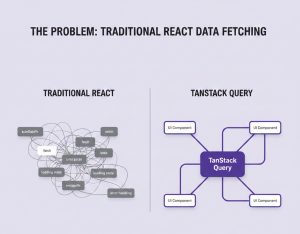
This is where TanStack Query in React comes in.
In this guide, we’ll walk you through everything from the absolute basics to advanced mastery of React Query. You will learn how it works, why it matters, and how it integrates with React effectively.
Why Use TanStack Query in React?
Before diving into the code, let’s discuss why TanStack Query (formerly known as React Query) is the best option for handling server state management.

- Improved Performance: It offers features like background refetching and pagination, intelligently caches your data, and minimizes pointless network queries.
- User-Friendliness: A few hooks can replace numerous lines of useState and useEffect code. This simplifies and streamlines your components.
- Community Support: TanStack Query offers extensive documentation and has a large community always ready to help.
- Built-in SEO Strategies: Prefetching, efficient caching, and other features critical for page speed and user experience help your content load rapidly.
Key Features of TanStack Query

- Declarative Data Fetching: Define what data you need without manually controlling its lifecycle.
- Automatic Caching & Background Updates: When data is stale, it is stored in a smart cache and updated in the background.
- Pagination & Infinite Queries: Hooks built-in to help you manage complicated lists like feeds and endless scrolling.
- Optimistic Updates: Updates the UI before confirming a change to make it seem like the server is working faster.
Getting Started: Installation and Setup
You need a React project set up to continue with this tutorial (using Create React App, Vite, Next.js, etc.). TanStack Query in React requires React 16.8+.
Step 1: Install the Package
To install the package in your React project, run the following command in your terminal:
npm install @tanstack/react-query
Or with Yarn:
yarn add @tanstack/react-query
Step 2: Set Up the Query Client
Wrap your app with QueryClientProvider to make the query client available via context.
import { QueryClient, QueryClientProvider } from '@tanstack/react-query';
import { ReactQueryDevtools } from '@tanstack/react-query-devtools'; // Optional for debugging
const queryClient = new QueryClient();
function App() {
return (
<QueryClientProvider client={queryClient}>
{/* Your app components here */}
<ReactQueryDevtools initialIsOpen={false} /> {/* Devtools panel */}
</QueryClientProvider>
);
}
The QueryClient is the operation’s brain; it controls garbage collection, caching, and refetching. With settings like defaultOptions for global query behaviors, you can personalize it easily.
Understanding Query Keys — The Language of Your Data
Before we dive into the benefits of TanStack Query in React, we must accept one simple fact: React has no idea what your data is.
It does not know what you’re fetching, why you’re fetching it, or if two components are asking for the same thing. React only knows one thing: state. When you create a data-heavy React app without a server state management tool, you have to build your own solutions:
- You write useEffect for fetching.
- You store data in state or Context.
- You build your own caching logic.
- You write your own loading and error handling.
- You manually refetch when something changes.
- You fight stale data issues constantly.
As your app grows, everything becomes more complicated. This is the gap TanStack Query fills by providing something React has never had: Query Keys.
Query Keys: The Identity of Your Data
To understand React Query, you need to understand query keys. They are the heart and brain of the entire library. A query key is a unique label that identifies a particular piece of data in your app.
Consider it similar to identifying a box in your home:
- If the label is clear, you can always find what’s inside.
- If it changes, the package is deemed fresh.
- If two individuals search for the same label, they will find the same box.
- If something changes inside, all users of that box will be updated.
That’s precisely what query keys accomplish. In traditional React, nothing tells your app, “This is the users list,” or “This is the product with ID 42.” But in TanStack Query, you declare data explicitly:
queryKey: [“users”]
or with filters:
queryKey: [“products”, category]
Now your data has an identity. It has a place in the cache, and your app suddenly becomes smart.
Query Keys Automatically Trigger Refetches
When your query key changes, TanStack Query automatically knows to refetch.
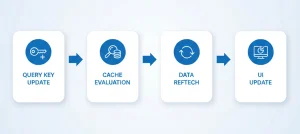
queryKey: [“products”, category]
If category changes from “electronics” to “fashion”:
- The key changes.
- TanStack Query recognizes that the data is different.
- A new fetch occurs immediately.
Query Keys Create Shared “Data Channels”
Consider two parts of your application that require the same information, such as a list of users, a dashboard count, and a sidebar with user avatars. Each component would typically fetch data once more, wasting network resources.
But with TanStack Query:
useQuery({
queryKey: ["users"],
queryFn: fetchUsers
});
Any component that uses the same key gets the same cached data, updates together, refetches together, and never sends duplicate requests.
Fetching Data with useQuery
When you start working with TanStack Query in React, the very first hook you’ll use—and probably the one you’ll use the most—is useQuery. It is the heart of the entire library. But to appreciate how powerful it is, we first need to look at how things work in traditional React applications.
Data Fetching in Traditional React
Fetching data usually looks like this:
useEffect(() => {
fetchData();
}, []);
This seems simple, but the moment real-world requirements creep in, things get complicated. With a simple useEffect, YOU are responsible for writing your own loading state, error state, caching logic, and avoiding race conditions. React never intended useEffect to be a full server state management solution.
Using TanStack Query’s useQuery
The useQuery hook is a fully managed data-fetching system. Instead of manually orchestrating your loading states, errors, caching, synchronization, and retries, useQuery handles all of it.
Here’s what it looks like in action:
import { useQuery } from "@tanstack/react-query";
function TodoList() {
const { data, isLoading, isError } = useQuery({
queryKey: ['todos'],
queryFn: () => fetch('/api/todos').then(res => res.json())
});
if (isLoading) return <p>Loading...</p>;
if (isError) return <p>Error!</p>;
return (
<ul>
{data.map(todo => <li key={todo.id}>{todo.title}</li>)}
</ul>
);
}
With just a few lines of code, TanStack Query in React gives you features for free:
- isLoading tells you the exact moment a request begins.
- isError and error give structured error handling out of the box.
- Fetched data is cached automatically—no need to store it in your own state.
- It knows when your data is “fresh” or “stale,” and decides intelligently whether to refetch.
Stale Time vs Cache Time
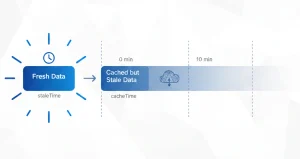
These two settings control how efficiently your app fetches data and how fast the UI feels. Yet many developers confuse them. React Query gives you full control over when to refetch and how long to keep data in memory.
staleTime — How Long Data Is Fresh
staleTime indicates how long data is considered fresh. Fresh data will NOT refetch automatically when the component mounts or the window refocuses. Only when the staleTime expires does React Query say, “Okay, this data might be old now… should I refetch?”
import { useQuery } from "@tanstack/react-query";
const { data } = useQuery({
queryKey: ['products'],
queryFn: fetchProducts,
staleTime: 1000 * 60, // 1 minute
});
- For 60 seconds → data is fresh.
- After 60 seconds → data becomes stale, so background refetching becomes allowed.
cacheTime — How Long Data Stays in Memory
Even if data is stale, TanStack Query keeps it in memory for some time. That time window is controlled by cacheTime.
import { useQuery } from "@tanstack/react-query";
const { data } = useQuery({
queryKey: ['products'],
queryFn: fetchProducts,
cacheTime: 1000 * 60 * 5, // 5 minute
});
The data stays cached for 5 minutes even if the user leaves the page. No refetch is needed if they return during this window.
Refetching — Automatic & Manual
Managing refetching is one of the biggest hassles in React. TanStack Query in React gives you complete control over data refreshing without writing a single useEffect or complicated side-effect chain.
Manual Refetching — The Simple Way
Every useQuery returns a refetch function:
const { data, refetch } = useQuery({
queryKey: ['todos'],
queryFn: fetchTodos
});
You can now refresh data anytime:
<button onClick={() => refetch()}>Refresh</button>
Automatic Refetching
TanStack Query provides options that automatically update your user interface.
useQuery({
queryKey: ['todos'],
queryFn: fetchTodos,
refetchOnWindowFocus: true,
refetchOnReconnect: true,
refetchInterval: 3000 // every 3 seconds
});
- Browser Tab Focus (refetchOnWindowFocus): Whenever the user goes back to your tab, it automatically refetches if data is stale.
- Auto-refresh After Losing Internet (refetchOnReconnect): Detects reconnection and refetches any stale queries immediately.
- Real-Time Polling (refetchInterval): Updates data on a regular basis, perfect for live crypto prices or notifications.
Mutations: Writing Data with TanStack Query
TanStack Query in React handles data updating and fetching independently:
- Queries → To read data
- Mutations → To write data (create, update, delete)
In traditional React, sending a request and manually updating state is repetitive. React Query simplifies this through query invalidation.
Example: Mutation for Adding a Todo
import { useMutation, useQueryClient } from "@tanstack/react-query";
function AddTodo() {
const queryClient = useQueryClient();
const mutation = useMutation({
mutationFn: newTodo =>
fetch('/api/todos', {
method: 'POST',
body: JSON.stringify(newTodo),
headers: {
'Content-Type': 'application/json'
}
}).then(res => {
if (!res.ok) {
throw new Error('Failed to add todo');
}
return res.json();
}),
onSuccess: () => {
// Invalidate the 'todos' query so it refetches
queryClient.invalidateQueries(['todos']);
console.log("Todo added successfully!");
},
onError: (error) => {
// Handle error, show notification or alert
console.error("Error adding todo:", error);
alert(error.message);
}
});
return (
<button
onClick={() => mutation.mutate({ title: "New Todo" })}
disabled={mutation.isPending} // disable while pending
>
{mutation.isPending ? "Adding..." : "Add Todo"}
</button>
);
}
Once the mutation succeeds, TanStack Query invalidates the cache for [‘todos’]. The user interface refreshes instantaneously without requiring manual state changes.
Mutation States — Making UI Feedback Effortless
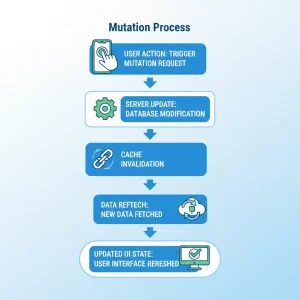
Not only does the mutation system update the server and refresh your user interface, but it also makes user feedback simple and reliable.
The Four Core Mutation States
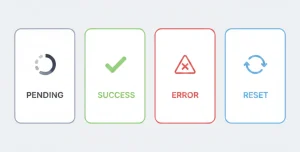
mutation.isPending: The request is ongoing. Use this to disable buttons or show spinners.
<button disabled={mutation.isPending}>
{mutation.isPending ? "Saving..." : "Save"}
</button>
mutation.isSuccess: Operation completed successfully. Use this to show success messages or close modals.
{mutation.isSuccess && <p className="success">Todo created!</p>}
mutation.isError: Something went wrong. Great for showing error alerts.
{mutation.isError && <p className="error">Oops! Something went wrong.</p>}
mutation.error: Detailed error information. This gives you the actual error object for debugging.
{mutation.isError && <p>{mutation.error.message}</p>}

Parallel Queries — Fetch Multiple Things at Once
On many pages, you often need multiple independent data sources. With TanStack Query in React, running parallel queries is effortless.
import { useQuery } from "@tanstack/react-query";
function Dashboard() {
const usersQuery = useQuery({
queryKey: ['users'],
queryFn: () => fetch('/api/users').then(res => res.json())
});
const productsQuery = useQuery({
queryKey: ['products'],
queryFn: () => fetch('/api/products').then(res => res.json())
});
if (usersQuery.isLoading || productsQuery.isLoading) return <p>Loading...</p>;
if (usersQuery.isError || productsQuery.isError) return <p>Error loading data</p>;
return (
<div>
<h2>Users</h2>
<ul>
{usersQuery.data.map(user => <li key={user.id}>{user.name}</li>)}
</ul>
<h2>Products</h2>
<ul>
{productsQuery.data.map(product => <li key={product.id}>{product.title}</li>)}
</ul>
</div>
);
}
The postsQuery waits for userQuery.data to exist. This prevents unnecessary or invalid API calls.
Pagination & Infinite Scroll
Pagination and infinite scroll can be difficult in React. TanStack Query in React makes managing these complex lists easier with dedicated hooks.
Pagination Example
For classic page-by-page fetching, use useQuery with a page key:
import { useQuery } from "@tanstack/react-query";
function Projects({ page }) {
const { data, isLoading, isError } = useQuery({
queryKey: ['projects', page],
queryFn: () => fetch(`/api/projects?page=${page}`).then(res => res.json()),
});
if (isLoading) return <p>Loading...</p>;
if (isError) return <p>Error loading projects</p>;
return (
<ul>
{data.projects.map(project => (
<li key={project.id}>{project.name}</li>
))}
</ul>
);
}
Infinite Scroll Example
For infinite scrolling, use useInfiniteQuery:
import { useInfiniteQuery } from "@tanstack/react-query";
function Feed() {
const {
data,
fetchNextPage,
hasNextPage,
isFetchingNextPage
} = useInfiniteQuery({
queryKey: ['feed'],
queryFn: ({ pageParam = 0 }) =>
fetch(`/api/feed?cursor=${pageParam}`).then(res => res.json()),
getNextPageParam: lastPage => lastPage.nextCursor ?? undefined,
});
return (
<div>
{data.pages.flatMap(page =>
page.items.map(item => <div key={item.id}>{item.title}</div>)
)}
<button
onClick={() => fetchNextPage()}
disabled={!hasNextPage || isFetchingNextPage}
>
{isFetchingNextPage ? 'Loading...' : hasNextPage ? 'Load More' : 'No More Items'}
</button>
</div>
);
}
With this, you don’t need to manually store or merge pages. React Query handles it for you while keeping old pages cached.
Query Invalidation: The Key to Auto-Updating UI
Modifying data in a normal React application requires manual state syncing. TanStack Query in React solves this using query invalidation.
import { useMutation, useQueryClient } from "@tanstack/react-query";
function AddTodo() {
const queryClient = useQueryClient();
const mutation = useMutation({
mutationFn: newTodo =>
fetch('/api/todos', {
method: 'POST',
body: JSON.stringify(newTodo)
}),
onSuccess: () => {
// Automatically refetch queries that depend on todos
queryClient.invalidateQueries(['todos']);
},
onError: (error) => {
console.error('Failed to add todo:', error);
}
});
return (
<button onClick={() => mutation.mutate({ title: "New Todo" })}>
Add Todo
</button>
);
}
This ensures consistency between the UI and server data automatically.
Error Handling & Retry Logic: Never Fear Failed Requests
Handling API issues and retries usually requires a lot of code. TanStack Query simplifies this with built-in logic.
import { useQuery } from "@tanstack/react-query";
function Todos() {
const { data, isLoading, isError, error } = useQuery({
queryKey: ['todos'],
queryFn: () => fetch('/api/todos').then(res => res.json()),
retry: 3, // Automatically retry failed requests up to 3 times
retryDelay: attempt => attempt * 1000, // Exponential backoff: 1s, 2s, 3s
});
if (isLoading) return <p>Loading...</p>;
if (isError) return <p>Error: {error.message}</p>;
return (
<ul>
{data.map(todo => <li key={todo.id}>{todo.title}</li>)}
</ul>
);
}
This eliminates clumsy retry loops and smoothly handles brief network outages.
React Query Devtools: The Best Debugging Tool
It is challenging to see what’s going on behind the scenes. React Query Devtools helps you debug queries and cache in real-time.
How to Install
npm install @tanstack/react-query-devtools
How to Use
import { QueryClient, QueryClientProvider } from "@tanstack/react-query";
import { ReactQueryDevtools } from "@tanstack/react-query-devtools";
import App from "./App";
const queryClient = new QueryClient();
function Root() {
return (
<QueryClientProvider client={queryClient}>
<App />
<ReactQueryDevtools initialIsOpen={false} />
</QueryClientProvider>
);
}
export default Root;
This tool helps you visualize cache issues, infinite queries, and background refetches.
Best Practices for Real-World Applications
To use TanStack Query in React effectively, you need to adopt patterns that make your app fast and reliable.
- Set Proper staleTime: Decide how fresh your data needs to be.
- useQuery({
- queryKey: [‘userProfile’, userId],
- queryFn: fetchUserProfile,
- staleTime: 1000 * 60 * 5, // 5 minutes
- });
- Use Meaningful Query Keys: Make keys descriptive and unique (e.g., [‘todos’, userId]).
- Avoid Unnecessary Refetches: Configure refetchOnWindowFocus wisely.
- Use Infinite Queries for Lists: Ideal for feeds or tables.
- const { data, fetchNextPage, hasNextPage } = useInfiniteQuery({
- queryKey: [‘posts’],
- queryFn: fetchPosts,
- getNextPageParam: lastPage => lastPage.nextCursor,
- });
- Use Mutations with Optimistic Updates: Update the UI instantly before the server responds.
- Use Dependent Queries Carefully: Use the enabled flag to prevent unnecessary requests.
- enabled: !!userQuery.data
- Always Use Devtools: To visualize cache, queries, and mutations.
Final Conclusion — TanStack Query: A New Standard for React Server State
Managing server state has historically been the most complicated part of React development. TanStack Query in React provides a strong and effective way to handle data, allowing you to let go of complicated useEffect sequences and manual loading states.
Instead, it provides you with performance through caching, consistency via automatic syncing, and scalability for complex features. React Query is much more than simply a library; it’s a tool that helps produce excellent React apps, simplifying your code and improving dependability.